


The paper cheque has a long history, but is it going the way of the dodo? We take a look at some of the global trends.

EFT Processing
Streamline Sage 300 payments & receipts using Electronic Funds Transfer

"The support we receive from Orchid is top notch, and the Return on Investment was pretty much immediate."
JIM BROMILOW, CORPORATE CONTROLLER, GRANT THORNTON LLP, CANADA
Improved efficiency leads to happier customers, vendors and employees
A quick ROI, thanks to savings on stationery, handling, postage, and bank transaction fees
- Increased automation means improved efficiency, greater accuracy, lower costs
- Save time and reduce errors by avoiding duplicate data entry
- Numerous security features, including audit-logging and encryption of bank account details
- Have confidence that your cash movements are secure, and would stand up to an audit
- Hundreds of bank formats already supported, others created on request
- Reduce exposure to fraud by moving away from paper cheques or streamlining positive pay file processing
EFT Processing Features
The features below (where applicable) are available with both the AP/AR and Payroll editions
EFT File Creation
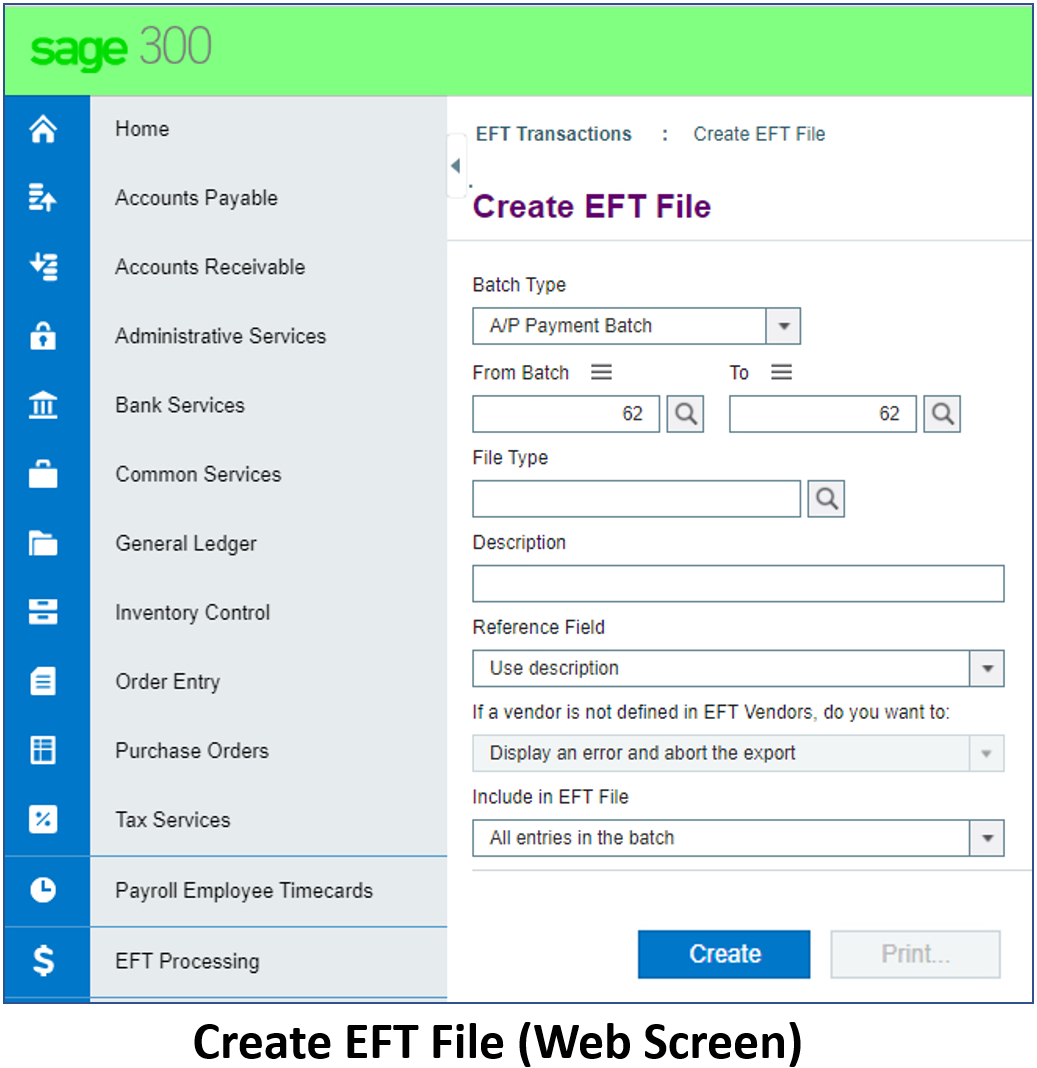
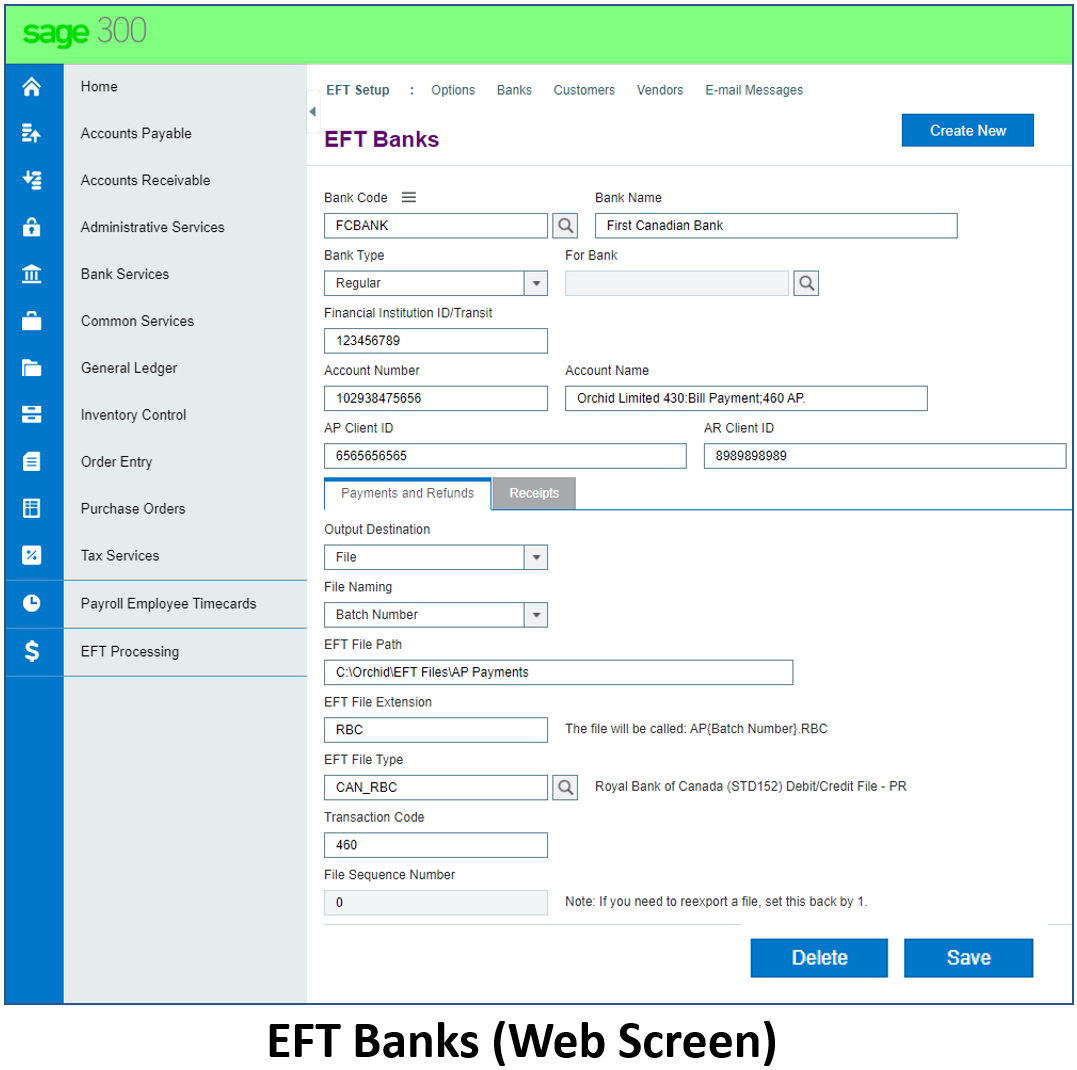
Creates EFT files in the format required by your bank, for both payments and receipts:
- Creates EFT Payment files based on the standard Sage 300 processing routines, i.e. A/P Payments, Payroll Cheques, A/R Customer Refunds
- Creates EFT Direct Debit files based on the standard Sage 300 A/R receipt processing routine
- Optionally, when generating bank files, elect to skip or error on Vendors/Customers/Employees who are not defined in EFT Processing
- Summary transaction logs are created
Bank File Formats supported:
- Already supports 800+ bank formats, from 80+ countries
- Supports user-definable bank formats
- Supports positive pay file formats
- Supports SEPA (Europe) and BPAY (Australia) formats
- We are frequently adding new formats, or updating existing ones
- If the format you need is not currently supported, Orchid Systems can create it
Remittance Advice and Processing Options
- Remittance Advices can be emailed, using standard Sage 300 functionality, to EFT-specific Customer/Vendor/Employee email addresses
- Outbound emails can be throttled or capped to cater for email platform restrictions
- Can be configured to work with posted or unposted batches or payroll cheques
- Configure to select from a range of batches, pay period end dates, or selected entries
Security Features
- Changes to Vendor/Customer/Employee bank account details require a 2-step approval process
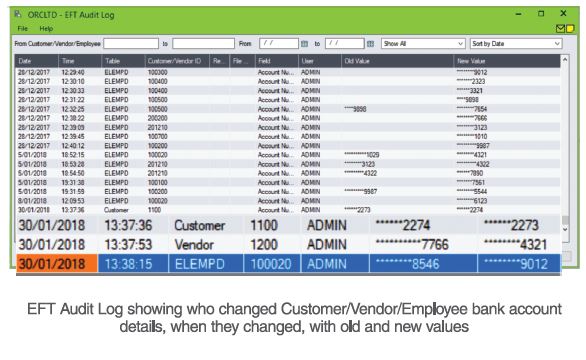
- Extensive audit logs of changes made and transactions created
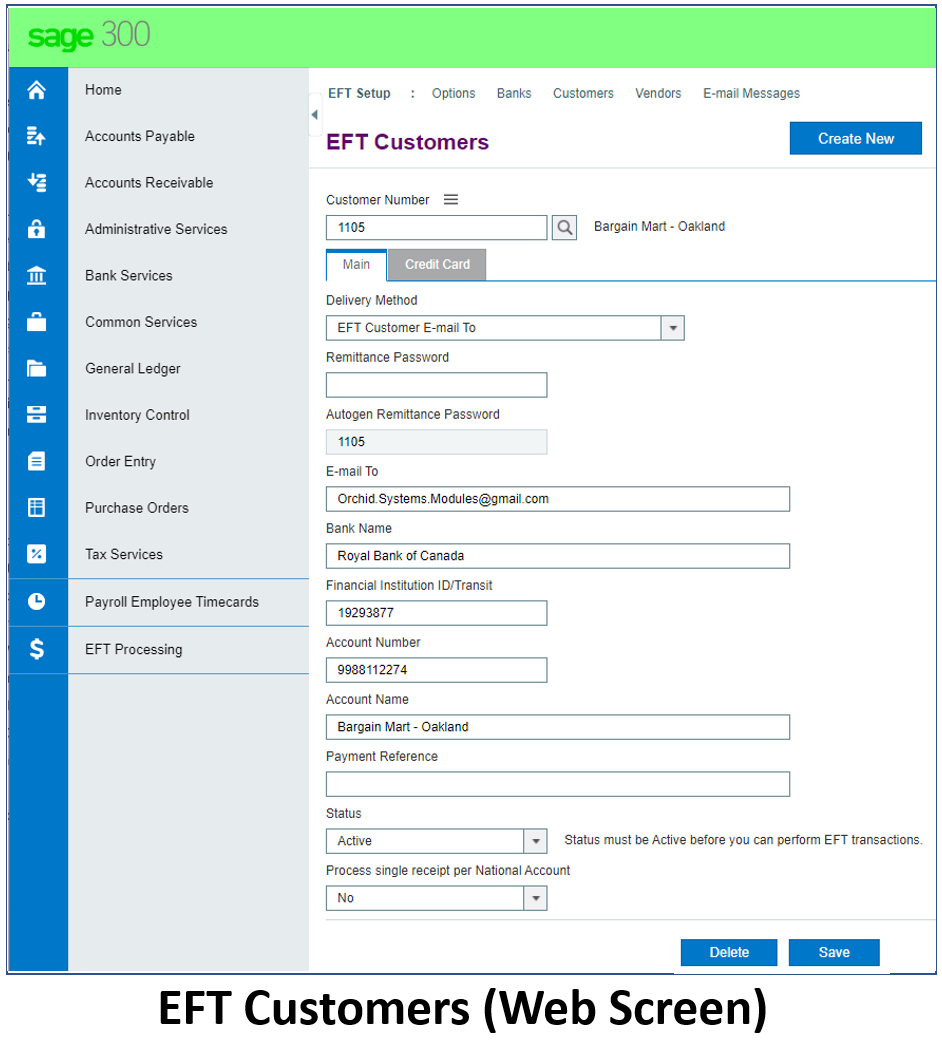
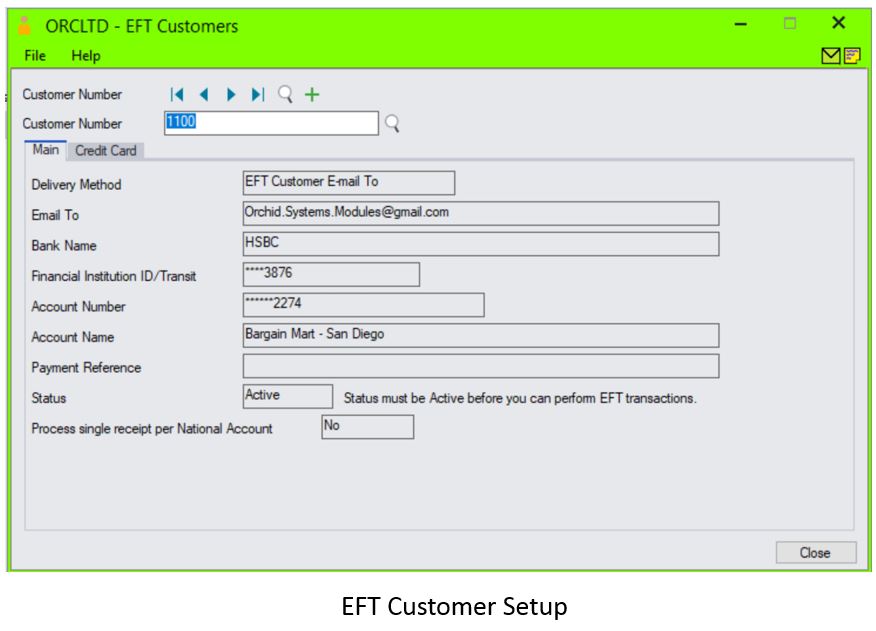
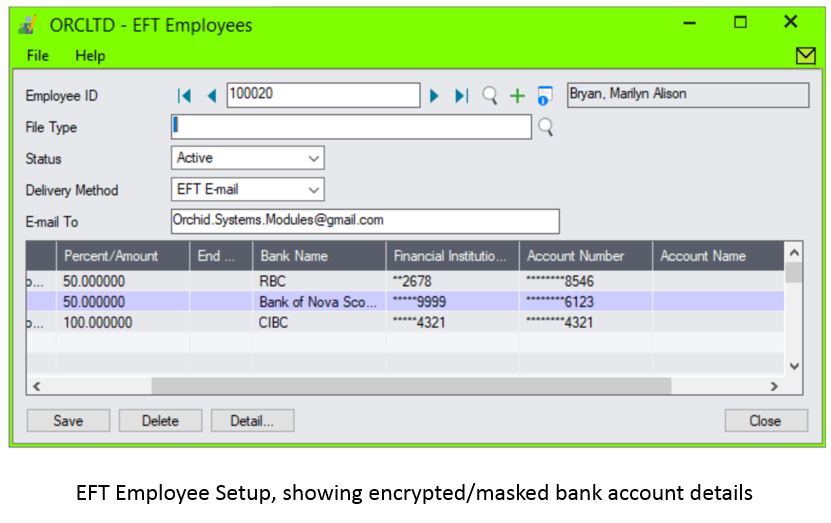
- Bank Branch Code and Account Numbers stored in your database can be encrypted - users will only see a masked version
- Optional protection of emailed Remittance Advices using a formula-driven password
- Periodic processing task to delete inactive records
- EFT details are cleaned out when the associated Vendor or Customer is deleted
EFT Bank Details
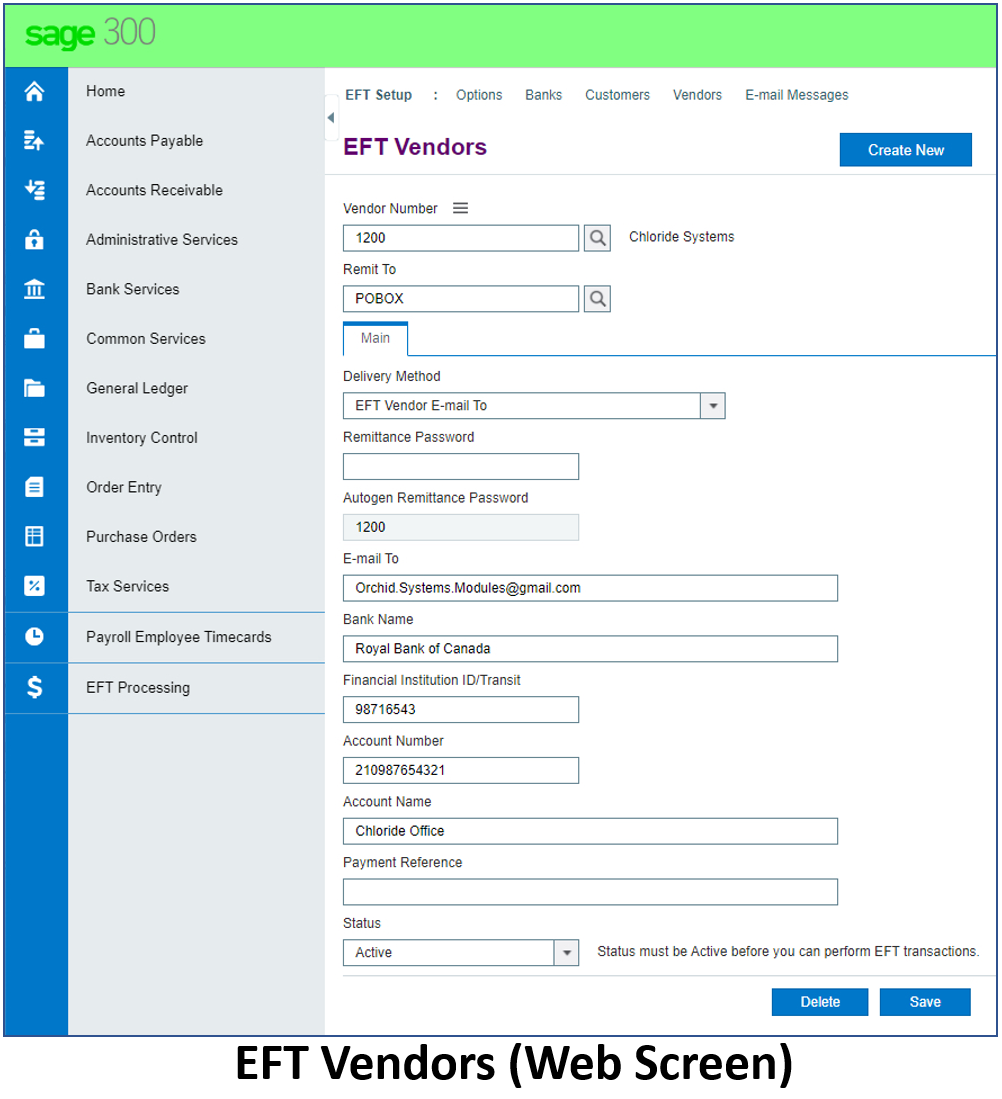
- EFT Processing for AP/AR holds banking details for Vendors and Customers
- EFT Processing for Payroll holds banking details for Employees
- Warns if duplicate EFT bank branch codes or accounts are entered for Vendors or Customers
- Supports user-definable screen labels to reflect bank terminology
- Optionally stores Vendor bank account details by remit-to code
A Sage 300 Module
- Developed in the Sage 300 SDK, providing the familiar Sage 300 look & feel plus standard security, customization capabilities, data integrity checking, and more
- Stores all data within Sage 300 and integrates seamlessly with AP, AR, US Payroll, and Canadian Payroll
- Supports Customer/Vendor Number Change
- French language selection supported

Cost savings add up to a quick ROI
- Reduced bank transaction fees
- No more expensive paper cheque stationery
- Reduced printing, handling and postage costs
- Automatic EFT file creation avoids duplicate data entry
EFT Processing Edition Guide
(You can also combine the AP/AR and Payroll editions in a bundle.)
EFT Processing for AP & AR
For processing payments & receipts using:
- Sage 300 Accounts Payable and/or;
- Sage 300 Accounts Receivable
AP/AR specific features:
- Option to define an EFT Clearing bank account for AP Payments, enabling bank reconciliations by EFT transfer total
AR Receipt and Refund Generation
- Option to change Invoice Due Dates on posted AR Invoices
- Automatically create AR Receipt Batches and associated bank files from AR transaction balances using highly flexible selection criteria, including the option to cater for National Accounts
- Create AR Refund Batches to refund credit balances to customers and create the associated bank file
- Create zero-value AR Receipt Batches to apply open AR Documents: Debit documents (Invoices, Debit Notes, Interest Invoices) can be automatically applied to credit documents (Prepayments, Unapplied Cash, Credit Notes)
EFT Processing for Payroll
For processing payments to employees using:
- Sage 300 US Payroll, or;
- Sage 300 Canadian Payroll
Payroll specific features
- Allows you to split Employee payments into multiple bank accounts, based on flexible rules
- Supports the emailing of Pay Stubs/Slips, T4 or Relevé 1 PDF documents
- Provides password protection of those documents (when enabled for EFT Remittance Advices)
Testimonials
Product Screenshots





Minimum
Requirements
- Features relate to the latest supported version.
- EFT Processing for AP & AR requires Sage 300 Accounts Receivable and/or Accounts Payable.
- EFT Processing for Payroll requires Sage 300 Canadian Payroll or US Payroll.
International Contacts
Please contact us directly if your business is in the UK, Europe or other regions not listed here.
North/South/Central America and the Caribbean
Robert Lavery
Phone: (416) 453-7876
Email: Robert.lavery@sympatico.ca
Address:
Robert Lavery & Associates
14 Woodway Trail
Toronto, Ontario CANADA M8Y 2B8
Asia Region
A-Plus Software Limited (ID#82011633)
Phone: + 852-2366 8392
Email: info@a-plussoft.com
Website: www.a-plussoft.com/en/orchid.php
Address:
5/F Goldsland Building
22 Minden Avenue, Tsim Sha Tsui,
Kowloon Hong Kong
Australia and New Zealand Region
Sage Software Australia - Business Management Solutions (ERP & CRM)
Phone: 137 243 (13 SAGE)
Website: https://www.sage.com/au
Level 11, Zenith Tower B,
821 Pacific Hwy,
Chatswood NSW 2067
Africa Region
Sage South Africa (Pty) Ltd
Phone: +27 11 304 3000Website: https://www.sage.com/za
6th Floor, Gateway West
22 Magwa Crescent
Waterfall 5-lr, Midrand, 2066
Middle East Region
Sage Middle East
Phone: +971 43900180
Website: https://www.sage.com/en-ae/support/contact-us
Office No. 118 Building No.11
Dubai Internet City (DIC)
Dubai, PO Box 500198
United Arab Emirates (UAE)
